Bridging the Gap: Why Agentic Systems Need MCP
I’ve been using agentic applications like ChatGPT for a while—mostly as a learning companion. One of the most valuable aspects for me has been the ability to rephrase, simplify, or reframe complex content into something my brain can actually absorb. That process of iterating with an agent, asking it to explain things differently, has helped me understand and build new things I might have otherwise struggled with. It’s a powerful use case—one where learning becomes more accessible and more aligned with how each individual thinks, often leading to the creation of new ideas or tools.
Most of the time, I found myself copying and pasting content just to reframe it. That repetitive pattern made me realize how this kind of interaction could extend beyond simple copy/paste and into connecting with the intranet world—enabling deeper integration with real-world systems and workflows, particularly in domains I work with, like Identity and Access Management (IAM).
To continue this learning excursion, I set out a clear use case—one I clearly understand and paired it with AI.
Enable support agents to use agentic AI to interact with identity systems, allowing them to query user details by username or activate/disable accounts to perform their duties effectively.
In 2024, during this exploration, I came across something called Retrieval-Augmented Generation (RAG), paired with a framework called LangChain. This combination allowed me to extend OpenAI’s LLM with my own private data stored in a vector database, using a chain-based design pattern. It was my first real insight and learning into how LLMs could be grounded in an organization’s specific context—working with offline data or information they weren’t originally trained on.
To see it in action, I put together a small demo where I loaded a PDF document into a vector store and connected it to OpenAI LLM via LangChain. I was then able to query the content and interact with it conversationally. The setup was relatively simple, but it clearly demonstrated how agentic systems can begin to bridge the gap between static documents and dynamic, context-aware engagement.
However, this approach didn’t quite align with the support use case I was exploring. The identity data already existed in a directory store, and standing up new infrastructure to vectorize constantly changing identity data didn’t make much sense. So, I shelved the idea and moved on—until this year, when I came across the Model Context Protocol (MCP) specification. That’s when things started to click again.
What is MCP?
MCP specification defines a protocol that acts like a bridge between AI models and your private resources. It gives AI a common language to connect with existing systems—without changing those systems or transforming existing data into vector-based content. Think of it like a USB-C port for AI: a standardized way to plug into different tools and data sources so AI can operate with real-world context. This is achieved by developing a component called the MCP Server—a bridge in the earlier analogy—that follows the MCP protocol specification and can be configured to run locally or accessed remotely via HTTP.
In the MCP protocol, several key players work together to make agentic conversations happen:
- LLMs (Large Language Models): These are the smart AI brains, like OpenAI or Anthropic’s models, that understand and generate natural language text;
- Hosts: These are the apps you use to chat with the AI, like Claude or fast-agent. They act like the chat window or platform where you type your questions and get answers;
- Clients: This is a built-in component of an LLM-powered app (like Claude or fast-agent) that establishes a dedicated one-to-one connection with the MCP Server. It generates and sends requests to the MCP Server based on what the LLM is trying to retrieve or perform.
- Servers: These act as the middleman that knows how to fetch real data from authoritative systems like IAM platforms, file systems, or JIRA. They follow the MCP specification and expose capabilities as Resources, Prompts, and Tools that the LLM can use;
- Authoritative Systems: These are the real sources of truth where important data lives—like Ping One Advanced Identity Cloud (P1AIC) for identity data or JIRA for project data.
Putting MCP to Test
As part of my learning exploration, I wanted to get a firsthand understanding of the value MCP brings for my use case. After studying the specification and standing up a demo MCP server, a few things became clear:
- No changes to my existing systems: My identity system remains untouched and continues to operate as it is. I don’t need to vectorize data, replicate it, or reshape it into new formats just to make it usable by AI. All I need is access to my system’s REST API and the ability to communicate using JSON-based payloads.
- All development for this effort lives in the MCP Server: The MCP Server contains all the logic for accessing and translating identity data. Host or LLM applications simply know how to call it. This separation means the MCP server can evolve independently without requiring changes to how it’s consumed.
- Built on existing security standards: The June, 18 2025 MCP spec formally incorporates OAuth2.x and its extensions to secure and restrict communication to MCP servers.
- Prompts and Prompt Engineering: Set up guidance for the LLM using the Prompts feature—this lets me engineer prompts and supply tailored context so the LLM responds in a specific, controlled manner. I also learned that prompt engineering can enable the LLM to invoke third-party MCP servers that are outside my scope, which is a powerful capability.
Demo Architecture
At the time of writing, the core MCP SDK does not yet include several features introduced in the June 18, 2025 specification—most notably OAuth2.x support. To keep the initial demo straightforward and focused on learning, I omitted security around the MCP server. I’m mimicking a setup where the user is on a corporate network/intranet and the Ping Identity Platform is set-up on-premise or via VPC.
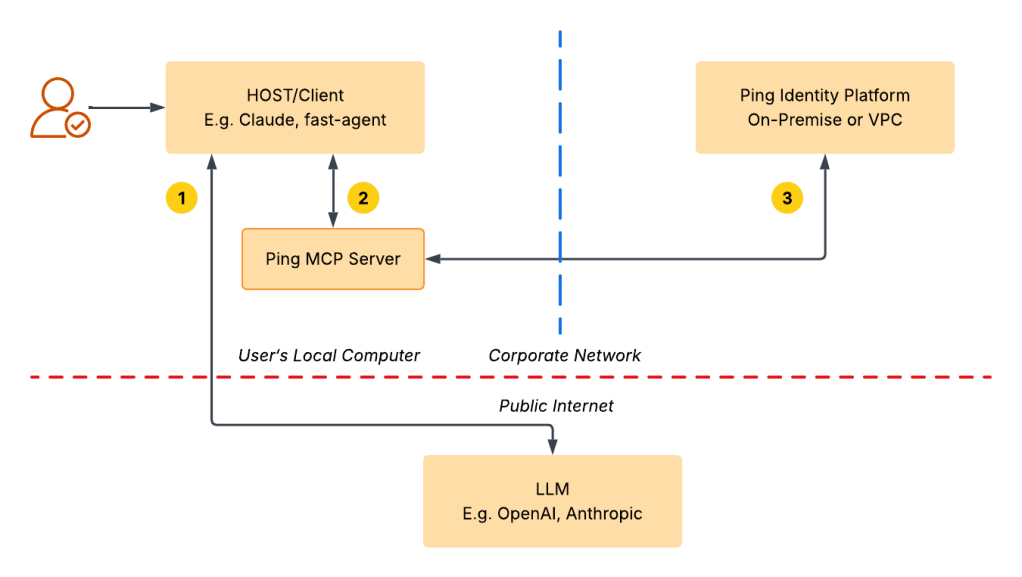
Here’s how it works:
- The LLM Application (Claude, fast-agent, etc.) runs locally on user’s machine and acts as the Host.
- The Ping MCP Server runs locally alongside the Host application. It handles MCP requests and communicates with the Ping Identity Platform using its REST APIs.
- When a request is received, the MCP Server communicates with the Ping Identity Platform—whether it’s on-premises or in a VPC—retrieves the necessary data, and returns it to the Host application, all while keeping the backend completely hidden from the LLM provider.
- The LLM (e.g., OpenAI or Anthropic) interfaces only with the Host. It does not interact directly with the Ping Identity Platform or the MCP server. Instead, the MCP server processes requests and sends structured responses back to the Host, which are then passed to the LLM.
Demo
This demo brings the use case to life by showing how both read and write operations can be integrated with my Ping Identity Platform. The demo uses “fast-agent” to set up the Ping AM MCP server locally. You can use any other LLM host app, like Claude or VS Code Copilot. I chose “fast-agent” because it clearly explains each interaction, showing when the MCP Server or the LLM is triggered.
Interaction Steps
Let’s take a look at what happens behind the scenes when I submit a prompt. With fast-agent, I can easily trace the flow of requests in all directions, based on the architecture described above.
Step 1 User: What is the first name of user jsingh?
Step 2 Host: My host is configured to use OpenAI’s LLM. For this prompt, it sends a completion request to OpenAI, along with tool details provided by my PingAM MCP server, as shown below. These tool definitions are included so that, if needed, the LLM can generate a follow-up tool call request to invoke the appropriate tool and respond accurately to the user’s question.
{
  "level": "DEBUG",
  "timestamp": "2025-07-22T13:34:46.463608",
  "namespace": "mcp_agent.llm.providers.augmented_llm_openai.default",
  "message": "OpenAI completion requested for: {'model': 'gpt-4.1-mini', 'messages': [{'role': 'system', 'content': 'You are a helpful AI Agent.'}, {'role': 'user', 'content': 'What is the first name of user jsingh?'}], 'tools': [{'type': 'function', 'function': {'name': 'pifr-mcp-server-toUpperCase', 'description': 'Put the text to upper case', 'parameters': {'type': 'object', 'properties': {'input': {'type': 'string'}}, 'required': ['input'], 'additionalProperties': False}}}, {'type': 'function', 'function': {'name': 'pifr-mcp-server-disableManagedUser', 'description': 'Disable managed user in IDM', 'parameters': {'type': 'object', 'properties': {'userName': {'type': 'string'}}, 'required': ['userName'], 'additionalProperties': False}}}, {'type': 'function', 'function': {'name': 'pifr-mcp-server-activateManagedUser', 'description': 'Activate managed user in IDM', 'parameters': {'type': 'object', 'properties': {'userName': {'type': 'string'}}, 'required': ['userName'], 'additionalProperties': False}}}, {'type': 'function', 'function': {'name': 'pifr-mcp-server-getManagedUser', 'description': 'Gets managed user from IDM', 'parameters': {'type': 'object', 'properties': {'userName': {'type': 'string'}}, 'required': ['userName'], 'additionalProperties': False}}}], 'stream': True, 'stream_options': {'include_usage': True}, 'max_tokens': 2048, 'parallel_tool_calls': True}"
}
Step 3 OpenAI LLM: In response to the completion request, the LLM determines that the user is seeking information about “jsingh.” It concludes that a tool call is needed to proceed and generates a structured payload as arguments for the tool. This payload is returned to the host application, which can then use it to make the actual call to the relevant PingAM MCP server tool. This is a key feature of this type of architecture—the LLM takes on the role of constructing such payloads and passing them to the host application for execution.
{
  "level": "DEBUG",
  "timestamp": "2025-07-22T13:34:47.451709",
  "namespace": "mcp_agent.llm.providers.augmented_llm_openai.default",
  "message": "OpenAI completion response:",
  "data": {
    "data": {
      "id": "chatcmpl-BwBB0lhiTduGc3TQMiYIVB1BcKr2Y",
      "choices": [
        {
          "finish_reason": "tool_calls",
          "index": 0,
          "logprobs": null,
          "message": {
            "content": null,
            "refusal": null,
            "role": "assistant",
            "annotations": null,
            "audio": null,
            "function_call": null,
            "tool_calls": [
              {
                "id": "call_QGI2vYZLweyeM7BDztX73NHF",
                "function": {
                  "arguments": "{\"userName\":\"jsingh\"}",
                  "name": "pifr-mcp-server-getManagedUser",
                  "parsed_arguments": null
                },
                "type": "function",
                "index": "0"
              }
            ],
            "parsed": null
          }
        }
      ],
      "created": 1753205686,
      "model": "gpt-4.1-mini-2025-04-14",
      "object": "chat.completion",
      "service_tier": "default",
      "system_fingerprint": null,
      "usage": {
        "completion_tokens": 23,
        "prompt_tokens": 150,
        "total_tokens": 173,
        "completion_tokens_details": {
          "accepted_prediction_tokens": 0,
          "audio_tokens": 0,
          "reasoning_tokens": 0,
          "rejected_prediction_tokens": 0
        },
        "prompt_tokens_details": {
          "audio_tokens": 0,
          "cached_tokens": 0
        }
      }
    }
  }
}
Step 4 Host: Based on the LLM’s response—indicating that a tool call is needed—the host uses the provided payload to build a tool request to the MCP server.
{
  "level": "DEBUG",
  "timestamp": "2025-07-22T13:34:47.461307",
  "namespace": "mcp_agent.mcp.mcp_agent_client_session",
  "message": "send_request: request=",
  "data": {
    "data": {
      "method": "tools/call",
      "params": {
        "meta": null,
        "name": "getManagedUser",
        "arguments": {
          "userName": "jsingh"
        }
      }
    }
  }
}
Step 5 MCP Server: Upon receiving the request to retrieve managed user ‘jsingh’, the MCP server uses the OAuth2.x Client Credentials grant to call the Ping Platform’s REST API at /openidm/managed/user?_queryFilter, passing in the arguments from the payload. Once the identity details are returned, the MCP server transforms the response and sends it back to the host application.
Step 6 Host: The host application receives the following response returned by the MCP server.
{
  "level": "DEBUG",
  "timestamp": "2025-07-22T13:34:52.640486",
  "namespace": "mcp_agent.mcp.mcp_agent_client_session",
  "message": "send_request: response=",
  "data": {
    "data": {
      "meta": null,
      "content": [
        {
          "type": "text",
          "text": "\"User: Jatinder Singh\\nUsername: jsingh\\nMail: jsingh@sqoopid.local\\nAccount Status: inactive\\n\"",
          "annotations": null,
          "meta": null
        }
      ],
      "structuredContent": null,
      "isError": false
    }
  }
}
Step 7 OpenAI LLM: Once the user details response is received from the MCP server, the host application forwards it to the OpenAI LLM, allowing the LLM to process the data and generate a final answer.
{
  "level": "DEBUG",
  "timestamp": "2025-07-22T13:34:52.641665",
  "namespace": "mcp_agent.llm.providers.augmented_llm_openai.default",
  "message": "OpenAI completion requested for: {'model': 'gpt-4.1-mini', 'messages': [{'role': 'system', 'content': 'You are a helpful AI Agent.'}, {'role': 'user', 'content': 'What is the first name of user jsingh?'}, ParsedChatCompletionMessage[NoneType](content=None, refusal=None, role='assistant', annotations=None, audio=None, function_call=None, tool_calls=[ParsedFunctionToolCall(id='call_QGI2vYZLweyeM7BDztX73NHF', function=ParsedFunction(arguments='{\"userName\":\"jsingh\"}', name='pifr-mcp-server-getManagedUser', parsed_arguments=None), type='function', index=0)], parsed=None), {'role': 'tool', 'tool_call_id': 'call_QGI2vYZLweyeM7BDztX73NHF', 'content': '\"User: Jatinder Singh\\\\nUsername: jsingh\\\\nMail: jsingh@sqoopid.local\\\\nAccount Status: inactive\\\\n\"'}], 'tools': [{'type': 'function', 'function': {'name': 'pifr-mcp-server-toUpperCase', 'description': 'Put the text to upper case', 'parameters': {'type': 'object', 'properties': {'input': {'type': 'string'}}, 'required': ['input'], 'additionalProperties': False}}}, {'type': 'function', 'function': {'name': 'pifr-mcp-server-disableManagedUser', 'description': 'Disable managed user in IDM', 'parameters': {'type': 'object', 'properties': {'userName': {'type': 'string'}}, 'required': ['userName'], 'additionalProperties': False}}}, {'type': 'function', 'function': {'name': 'pifr-mcp-server-activateManagedUser', 'description': 'Activate managed user in IDM', 'parameters': {'type': 'object', 'properties': {'userName': {'type': 'string'}}, 'required': ['userName'], 'additionalProperties': False}}}, {'type': 'function', 'function': {'name': 'pifr-mcp-server-getManagedUser', 'description': 'Gets managed user from IDM', 'parameters': {'type': 'object', 'properties': {'userName': {'type': 'string'}}, 'required': ['userName'], 'additionalProperties': False}}}], 'stream': True, 'stream_options': {'include_usage': True}, 'max_tokens': 2048, 'parallel_tool_calls': True}"
}
Step 8 Host: With the final data now available, the LLM has everything it needs to interpret the user’s original question and generate a complete response.
{
  "level": "DEBUG",
  "timestamp": "2025-07-22T13:34:53.222037",
  "namespace": "mcp_agent.llm.providers.augmented_llm_openai.default",
  "message": "OpenAI completion response:",
  "data": {
    "data": {
      "id": "chatcmpl-BwBB6FpZVDEXLudrW5utEimh1gvXV",
      "choices": [
        {
          "finish_reason": "stop",
          "index": 0,
          "logprobs": null,
          "message": {
            "content": "The first name of user jsingh is Jatinder.",
            "refusal": null,
            "role": "assistant",
            "annotations": null,
            "audio": null,
            "function_call": null,
            "tool_calls": null,
            "parsed": null
          }
        }
      ],
      "created": 1753205692,
      "model": "gpt-4.1-mini-2025-04-14",
      "object": "chat.completion",
      "service_tier": "default",
      "system_fingerprint": null,
      "usage": {
        "completion_tokens": 14,
        "prompt_tokens": 218,
        "total_tokens": 232,
        "completion_tokens_details": {
          "accepted_prediction_tokens": 0,
          "audio_tokens": 0,
          "reasoning_tokens": 0,
          "rejected_prediction_tokens": 0
        },
        "prompt_tokens_details": {
          "audio_tokens": 0,
          "cached_tokens": 0
        }
      }
    }
  }
}
This flow highlights the strength of an agentic architecture, where the LLM interprets user intent, initiates tool calls, and collaborates with the MCP server via the host LLM application to fulfill the request. The LLM constructs the payload for the tool call, which the host uses to interact with the Ping Platform through the MCP server. Once the required identity data is returned, the host passes it back to the LLM, enabling it to generate a final, context-aware response.
This architecture demonstrates a clear separation of concerns—where the LLM, host application, and backend systems each play distinct roles—resulting in a modular, intelligent, and extensible workflow.
Understanding Security Risks
At a high level, while implementing this demo, I identified three major security risks that warrant close consideration:
- Protecting the MCP Server – Since the MCP server acts as the gateway to the underlying Identity Platform, it must be secured using robust protocols and best practices outlined in the MCP specification—particularly OAuth2.x.
- Handling Sensitive Identity Data in LLMs – A significant concern arises from how identity data retrieved via the MCP server is passed to the OpenAI LLM. Once sensitive data, such as identity, healthcare, or other PII, leaves the controlled boundary, there is no guarantee how it will be used—whether for model training or other purposes. This lack of control presents a major risk for solutions dealing with sensitive personal information, demanding strict consideration and safeguards.
- Authorization – Ensuring that a user has the necessary privileges to access or use a specific tool is a critical security requirement. The ability to enforce fine-grained authorization—beyond simply checking scopes—is a significant advantage. Although my demo has mainly focused on human users, such as support agents, other MCP servers or agentic bots with Non-Human Identity (NHI) profile may also interact with a given MCP server. This makes implementing fine-grained authorization policies even more important. Since MCP servers can be configured as read-only or write-only, it’s essential to enforce user access control through an Authorization layer. This aspect must be carefully considered and integrated into the overall architecture and solution design.
Architecture Unboxed: Considering Other Possibilities
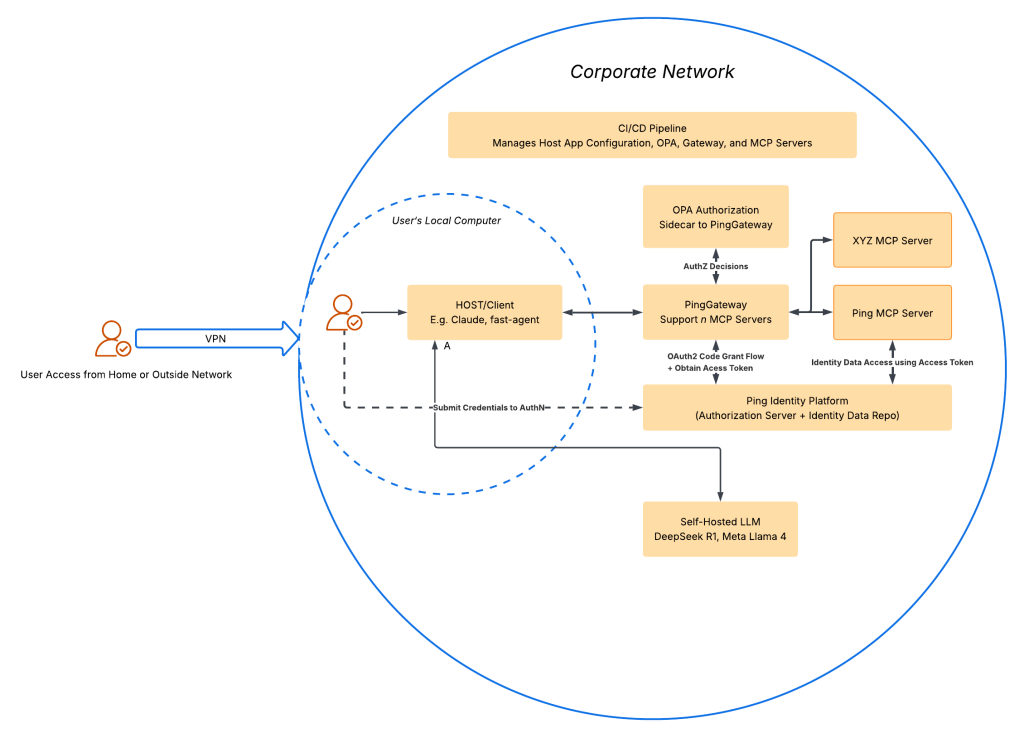
As organizations increasingly embed AI and agentic systems into their day-to-day workflows—and as the MCP specification continues to evolve to align with established security protocols and best practices—we’ll likely see multiple MCP servers deployed to facilitate agentic interactions across key products and services. Considering the sensitive nature of the data these servers may process, particularly PII, I firmly believe that running them remotely, rather than locally, offers more robust and scalable security controls.
Building on that assumption, a centralized, gateway-based infrastructure—pattern that’s been tested over time—can provide significant value by standardizing and centralizing security controls across all deployed MCP servers. This approach offers a holistic alternative to managing individual MCP servers in isolation. When integrated with CI/CD pipelines, it also introduces governance and visibility across the entire MCP agentic stack. In such a setup, MCP servers remain decoupled from the specifics of how security is enforced, as all security handling occurs before any request reaches them. Each MCP server would only need to present an access token, used as a bearer token (per RFC 6750), to securely make upstream requests. The architecture for this type of solution is illustrated below.
As noted in the earlier discussion on security risks, sharing sensitive data with a public LLM poses a significant threat. One way to address this is through an air-gapped setup, where an open-source LLM—such as Llama x or DeepSeek Rx—is self-hosted. This approach helps eliminate data exposure risks and can offer greater flexibility in usage, including the absence of tiered access or usage-based pricing.
Of course, this space is still evolving, so time will tell how things develop. That said, the challenges around security controls are not new, and the centralized gateway pattern has been proven over time. If you have any questions about this architecture, I’d be happy to discuss it further. I’ll also be actively watching for new developments in this area.
Conclusion
Through this demo, I was able to see firsthand how MCP functions and what interactions take place between the Host, LLM, MCP server, and the underlying identity systems. Standing it up gave me a much clearer understanding of how such a solution would work in practice. But it also surfaced a number of security risks that deserve serious consideration—especially when dealing with sensitive identity data and AI. That realization sparked a new line of thinking around how to architect and run a full stack of MCP servers with security, governance, and control built in from the start—not treated as optional add-ons. An architecture of such a solution is available above. If you have any questions, please don’t hesitate to reach out to me.
Disclaimer: This article was reviewed using LLM.
 Crafting Bits, Building Bonds
Leave a comment